Local Addresses
The following table contains addresses that can be used from Linux (/ Windows) and addresses that can be used from a local Chromebook. The reason for the differentiation is that Chromebooks default to using Google’s own DNS servers, which cannot resolve to home LAN addresses - though seems more reliable when wired.
For remote work on Chromebook I have set up a host called pi1p (Pi 1 Pipes) which forwards multiple relevant ports via pi1 for use over ssh port forwarding.
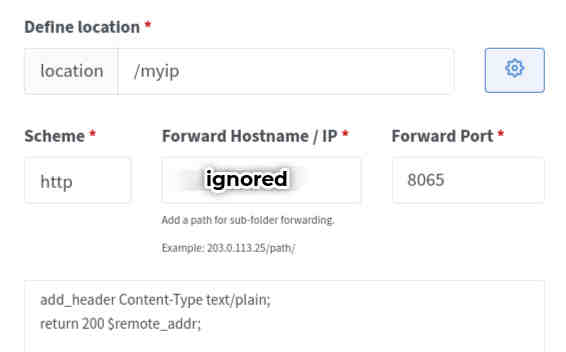
Home IP was fixed, but is now potentially re-assignable via DHCP. The current address ca be found as either dig bazdev.ydns.eu or doing curl https://baz.brusch.co.uk/myip from home. The setup for this is shown below.
| Linux | Chromebook | pi1p |
|---|---|---|
| Nginx Proxy Manager on Pi1 / non-proxied | NPM Pi1 | |
| Nginx Proxy Manager on Metal1 / non-proxied | Nginx Proxy Manager | Nginx Proxy Manager |
| Power Widget | Power Widget | |
| ProxMox | ProxMox | ProxMox |
| Uptime Kuma | Uptime Kuma | n/a |
| Portainer on Metal1/ supports pi1 | Portainer | Portainer |
| ~~~Portainer2 on Wise1~~~ Not active | Portainer | Portainer |
| TrueNAS | TrueNAS | TrueNAS |
| Single Sign-On/ KeyCloak | n/a | n/a |
| Docs | Docs | n/a |
| Docs Live Server | Docs Live Server | Docs Live Server |
| Modoboa Admin Portal | ||
| Gitea Server | Gitea Server | |
| Prometheus Server |
| Linux | Chromebook | pi1p |
|---|---|---|
| WRT01 | WRT01 | |
| WRT02 | WRT01 | |
| Home Assistant | Home Assistant |
| Linux | Chromebook | pi1p |
|---|---|---|
| NextCloud | NextCloud | NextCloud |
MyIP Setup
In Nginx Proxy Manager, add a Custom Location of ’/myip’. In the setup for that location, click the ⚙ and enter the following code:
add_header Content-Type text/plain;
return 200 $remote_addr;
e.g.