Nginx Proxy Manager
NPM is used to support https incoming connections identified by name and pass (proxy) them to services behind the firewall.
Originally this was goinfg to be a docker service, but after trying as both docker-compose and separate VM I have provisionally decided to run as a separte virtual host.
NPM Failure
On 16th Jan, I was unable to login and perform HTTPS certificate renewal. In the end I restarted the VM (via ProxMox) and it all started working. The synmptoms were:
- login webpage reported bad gateway
- Chrome DevTools should call to /api/tokens retruned a 502 Bad Gateway message.
Next Certicate renewal will be before 16th April.
Overview
Incoming connects come into VM host IP (currently 192.168.182.6). Based on hostname in HTTPS get, the requests as proxy forwarded to relevant host. HTTPS tunnel termnates within the Nginx Proxy Manager, so it works as HTTPS engine, load balance and router to each service.
Addresses are mapped accoring to Local Addresses list.
How To Renew Certificates
- On ADSL route, enable port forwarduing of 80 and 443 to NPM VM (currently 182.168.182.6).

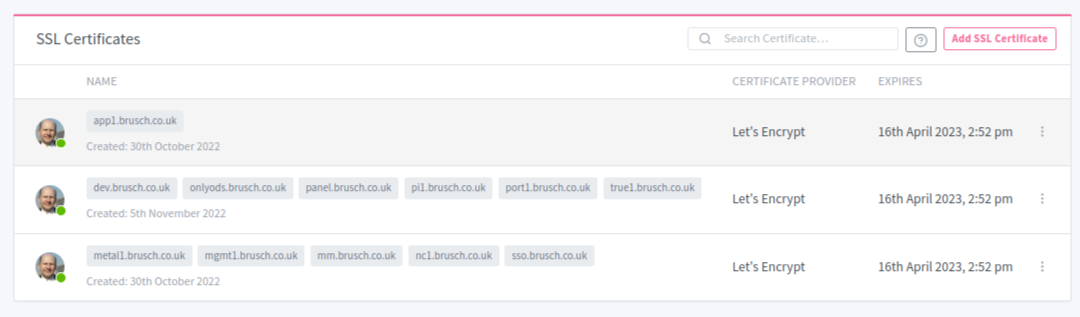
- Visit SSL Ceritificates page.
- Click 3-dots -> Renew Now - according to LetsEncrypt rules this can be done at most 28 days before end of validity. ( 3 dots = ).
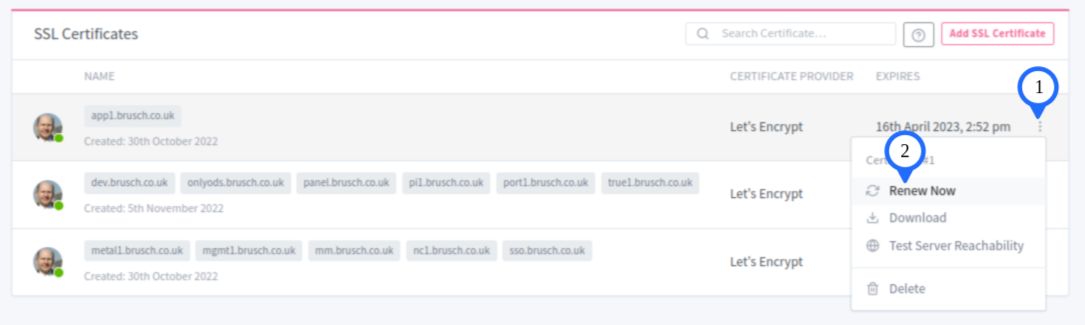
- Remove Port Forwarding Rules.
Bazone
On bazone, these ports are always mapped, so just renew the certificates from SSL Certificates page.
Redirect Hosts break the renewal process, so it is best to delete them, before renewing and re-add them afterwards. Currently the only one if karen.brusch.co.uk.