Email Service
Trying Modoboa
It is currently installed on far1 (192.168.182.8).
Modoboa documentation.
Modoboa Overview
Python/ Django web front-end to Dovecot.
Modoboa config is stored in /srv/modoboa/instance/instance, primarily in settings.py, though some in urls.py.
DKIM
DKIM installed as per docs, using psql view:
CREATE OR REPLACE VIEW dkim AS (
  SELECT id, name as domain_name, dkim_private_key_path AS private_key_path,
       dkim_key_selector AS selector
  FROM admin_domain WHERE enable_dkim
);
Installation needs completing.!
Followed https://modoboa.readthedocs.io/en/latest/installation.html
$ cat sql-aliases.cf
# This file was generated on Dec. 23, 2022, 9:06 p.m. by running:
# manage.py generate_postfix_maps --destdir /etc/postfix --force-overwrite
# DO NOT EDIT!
user = modoboa
password = iEllfUvPoLOolGmI
dbname = modoboa
hosts = 127.0.0.1:5432
query = SELECT alr.address FROM modoboa_admin_aliasrecipient AS alr INNER JOIN admin_alias AS al ON alr.alias_id=al.id WHERE al.enabled AND al.address='%s' AND (al.expire_at IS NULL OR al.expire_at>now())
Using Modoboa API
I have written a Python module called ModoboaAPI. It includes methods to:
- getIndentities()
- addAlias()
- addAcct()
Temporary Address - 192.168.182.10
Testing by running on far1, but with different IP address (192.168.182.10), so (hopefully) it is easy to move later.
To add the address to far1 and fix the break of DNS that is caused by adding the address use the following commands.
sudo ip addr add 192.168.182.10/24 dev enp37s0
sudo /usr/bin/resolvectl dns enp37s0 192.168.182.2
Forward to MailCatcher
To forward emails to mailcatcher (so we can debug emails sent), then we add a relay domain for the fake mailcatcher domain and consigure it to forward emails to localhost:1025.
e.g.
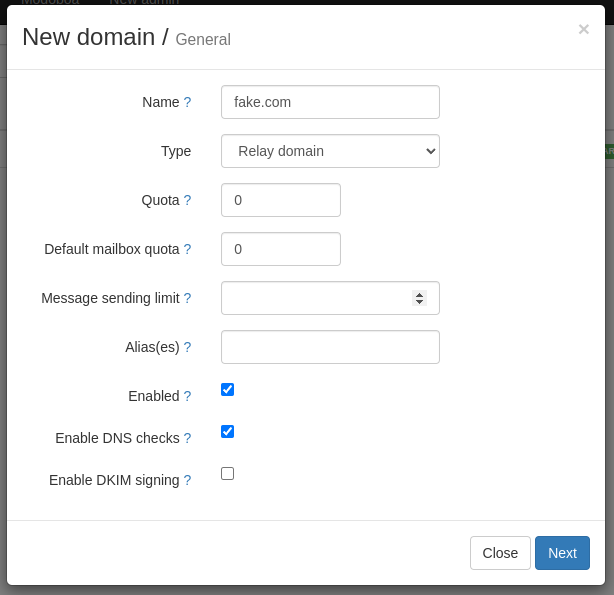
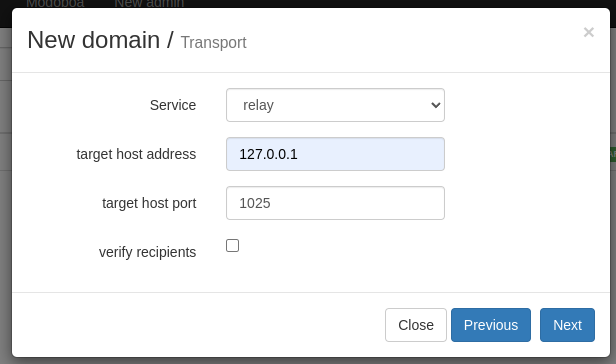
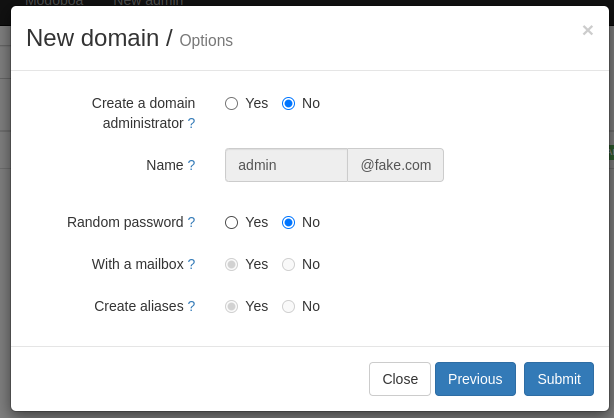
MailCatcher is run using a simple bash script to start and open on a web page:
#!/usr/bin/env bash
mailcatcher --http-port 1125 --smtp-ip=0.0.0.0 &> /dev/null
xdg-open http://localhost:1125 &> /dev/null
To install mailcatcher use gem install mailcatcher.
Each user must be configured with either a filter rule to forward emails or a forward all emails to <username>@<fakedomain>.
On Bazone - using postfix
BazOne is running standard postfix; it allows local apps (ie in docker containers) to send mails by connecting to bazones IP address port 25. This is done without authentication, port 25 is firewalled by ionos, so no external connections to the internal
Standard install of postfix, with some config modifications to:
- relay messages to ionos for all domains except bazicloud.com and bazone.com. This is configured using a tranport_map,
transport_maps = hash:/etc/postfix/transport - bazicloud.com and bazone.com is relayed to localhost:1025, so messages can be seen in (Mailcatcher)[https://slm.d5abcb3f.nip.io/]
smtpd_tls_security_level=maybecause iosnos needs TLS, but Mailcatcher does not support it. It would be better to force it on relay via ionos.- password map created for forwading to ionos, using
smtp_sasl_password_maps = hash:/etc/postfix/relay_pass - Configured to use copy of LetsEncrypt cert to prevent some clients refuxing to connect. This will cause an issue whenever the certificate is renewed. TODO: Find a better way to keep certificate up-to-date.
Config Files
/etc/postfix/transport:
bazone.com	relay:[localhost]:1025
bazicloud.com	relay:[localhost]:1025
*		relay:smtp.ionos.co.uk:587
/etc/postfix/relay_pass
smtp.ionos.co.uk:465 simon@brusch.co.uk:password
smtp.ionos.co.uk:587 simon@brusch.co.uk:password
smtp.ionos.co.uk simon@brusch.co.uk:password
smtp.ionos.co.uk:465 baz@brusch.co.uk:otherpassword
smtp.ionos.co.uk:587 baz@brusch.co.uk:otherpassword
smtp.ionos.co.uk baz@brusch.co.uk:otherpassword
Not sure which are needed, but it does no harm to include all ports and portless entries.